Our innovative facial recognition feature empowers your customers to swiftly revoke or update their consent preferences, providing a seamless and secure method for managing their privacy settings with ease.

Simple Requests via Line Application
Convenient and Effortless
Customers can easily manage their consent preferences by sending a request through the Line app, making the process as simple and familiar as chatting with a friend.


Enhanced Security with Dual Verification
Unmatched Protection through Facial and ID Card Verification
Our dual verification process, combining facial recognition with ID card verification, ensures that only authorized individuals can access or modify consent preferences, effectively reducing the risk of fraud.

Minimized Human Involvement
Lower the Risk of Data Breaches
By automating consent management, our facial recognition feature minimizes human involvement, ensuring sensitive information is securely handled and only accessible to authorized users.


Virtual Data Protection Agent
Your 24/7 Compliance Companion
Our Virtual Data Protection Agent is always available to assist customers with data protection inquiries, ensuring they feel supported and informed about their consent preferences.
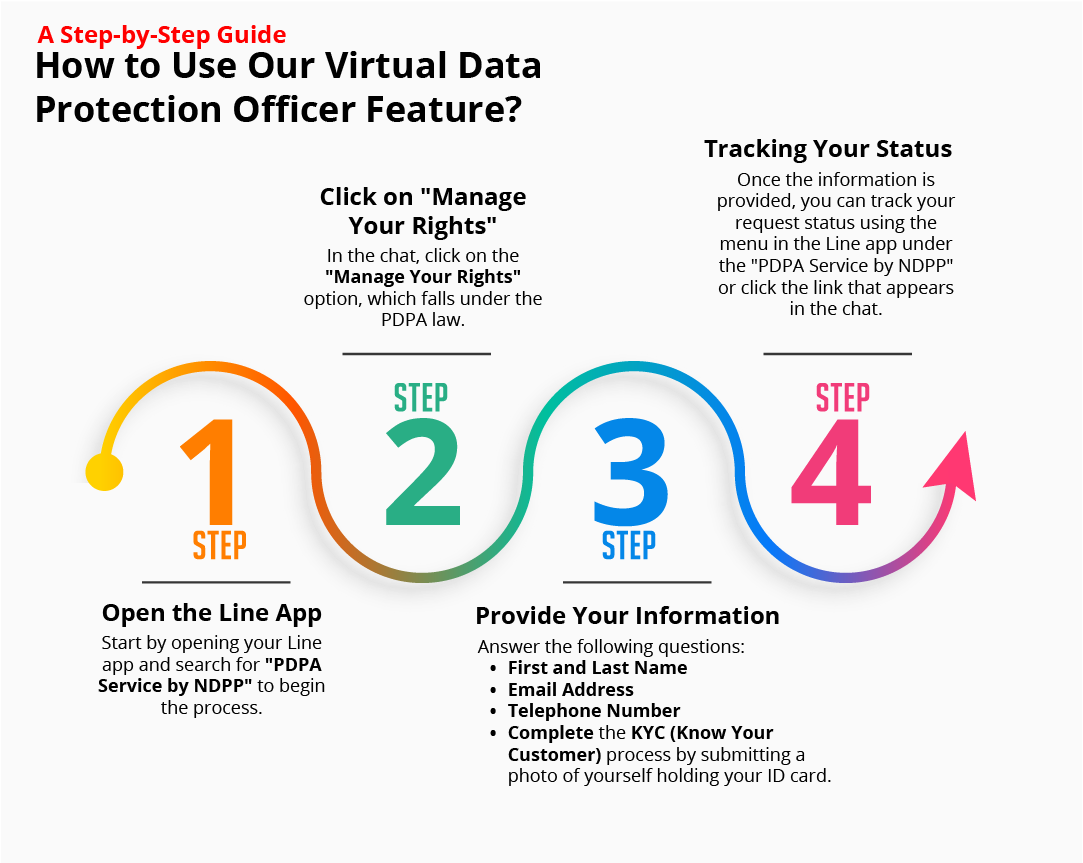
A Step-by-Step Guide
How to Use Our Virtual Data Protection Officer Feature?
1. Open the Line App
Start by opening your Line app and search for “PDPA Service by NDPP” to begin the process.


2. Click on "Manage Your Rights"
In the chat, click on the “Manage Your Rights” option, which falls under the PDPA law.
3. Provide Your Information
Answer the following questions:
- First and Last Name
- Email Address
- Telephone Number
- Complete the KYC (Know Your Customer) process by submitting a photo of yourself holding your ID card.


4. Tracking Your Status
Once the information is provided, you can track your request status using the menu in the Line app under the “PDPA Service by NDPP” or click the link that appears in the chat.